Tuesday, November 2, 2021

Sonicwall Ssl Vpn Best Practices

Content filter to block what you want. Detect Self-signed certificates Controls the detection of certificates where both the issuer and the subject have the same common name.


How Can I Setup Ssl Vpn Sonicwall

Hub and Spoke - Setting up VPNs when two or more remote sites Spokes want to connect.

Sonicwall ssl vpn best practices. Meet The 1 VPN Service for Singapore. Change SSLVPN Port to 443. Main Mode - Used when VPN Sites have permanentStatic public IP address.

These are between NSA3600 and a. Let the Savings Begin. Best practices recommend using SSLv3 or TLS in its place.

The advantage of this is that it allows you to specifically block access to the server that isnt connecting. SonicWall TZ270 SonicWall TZ370 SonicWall TZ470 SonicWall TZ570 SonicWall TZ670 SonicWall NSa 2700 GEN 6x SonicWall NSA 2650 SonicWall NSA 3650 SonicWall NSA 4650 SonicWall NSA 5650 SonicWall NSA 6650 AGSS CGSS. Blog Membership Intranet Community.

Ad Protect Your Privacy Online with a Top VPN. The sections below describe how to achieve best RDS performance over SonicWALL site-to-site VPN tunnels and many of the settings will also apply to connections using the software SonicWALL Global VPN Client. Enable or disable SSL-VPN access by toggling the zone below.

Detect Certificates signed by an Untrusted CA Controls the detection of certificates where the issuers certificate is not in the firewalls System Certificates trusted store. Aggressive Mode - Used when One Site has permanentstatic public IP and the other site has a dynamictemporary public IP address. 10 Steps to Online Community Success.

Ad Search Sonicwall Vpn on Shop411. Ad Secure VPN service developed by CERN and MIT scientists. I have setup site-to-site VPN tunnels for our different sites but I have a couple questions about what level of encryption I should be using.

9 Best Practices for Push Notifications. Sonicwall VPN is a client software that runs on your remote system to securely connect you to the Sonicwall at your network where you will then act as a part of the network like you would if you were in the office. Ad Secure VPN service developed by CERN and MIT scientists.

NOTEThe SSL VPN port will be needed when connecting using Mobile Connect and NetExtender unless the. The auto create check box on the zone allows an any rule to be created. SonicWall site to site VPN encryption best practices.

Unblock and stream content at home or while traveling. 1500 VPN servers in 94 countries. 1500 VPN servers in 94 countries.

Ive taken it a step further and am actively doing both a geo IP block and blocking just about every single top level domain that is. Meet The 1 VPN Service for Singapore. Ad Dont Let Your ISP Sell Your Browsing Data.

Get answers from your peers along with millions of IT pros who visit Spiceworks. SSLVPN terminates on the SonicWall s Interface IPs and cannot be. Ad Dont Let Your ISP Sell Your Browsing Data.

Some basic best practices will protect users during times of disaster and ensure that contingency networks and access are protected including two-factor authentication 2FA or multifactor authentication MFA and next-generation antivirus NGAV or endpoint protection such as SonicWall Capture Client Hi Experts I configured site to site vpn tunnel on sonicwall nsa 240 the tunnel is up but. Compare the Most Trusted VPNs for Security Anonymity. Figured Id start a thread on the best security practices for Sonicwall.

SSL VPN SSL VPN Server Settings. If you have allowed the SonicWALL to auto create rules and you uncheck the box on the zone it will remove the rules. Compare the Most Trusted VPNs for Security Anonymity.

Ad Search Sonicwall Vpn on Shop411. This is done to enhance the end user s experience. Let the Savings Begin.

Always a best practice to create rules yourself. Navigate to SSL VPN SERVER SETTINGS Select the SSL VPN Port and Domain as desired. Best Sonicwall Security Practices.

You must first change the default HTTPS Management port 443 mentioned previously Note. The Green indicates active SSL VPN status. Ad Protect Your Privacy Online with a Top VPN.

Types of site to site VPN scenarios and configurations. Obvious one is enabled Gateway Anti Virus Intrusion Protection. Unblock and stream content at home or while traveling.

By default unless checked on the zone all traffic is blocked tofrom this zone. Protect Your Internet Privacy Today. Protect Your Internet Privacy Today.

Sunday, October 31, 2021

Top Sonicwall High Availability Tips

Once you configure High Availability on the Primary SonicWall security appliance you push out the settings to the Backup SonicWall security appliance. Firewalls also Prevent Computer Viruses on Internet gateway level with benefits of.


06c 802 11b G N Router User Manual Sonicwall Tz 210 Series Getting Started Guide Sonicwall

SonicWall Hidden Features and Configuration Options.

Top sonicwall high availability tips. Click Device in the top navigation menu. Find out some other protection tips to. Top 5 Real User.

Right now we run these two connections into two Cisco switches and all of our. Only institution in India with the right blend of theory practical sessions. ActiveActive Clustering High Availability - ActiveActive Clustering is the most recent addition to the High Availability feature set in SonicOS.

Naturally I could use 2 network switches. According to the monitoring settings page the Ip address listed for primary Ip address and secondary Ip address appear wrong. 1 to connect the WANs together and 1 to connect the LANs together.

More than 50000 students trust ACTE. The antivirus and items of that nature were quite helpful to have. Firewall Support Hardware Software Firewall installation configuration and Remote Support Services Customer satisfaction is Firewall Firms s number one priority.

I have a two Sonicwall NSA250Ms where one of them is a high availability device. SonicWall Specialist Expert Advice. Login to the SonicWall management Interface.

SonicWALLs SRA SSL VPN is a highly secure solution with high availability and uptime which is absolutely essential for us. A system that can be run in independent. A typical ActiveActive Clustering deployment includes four firewalls of the same SonicWALL model configured as two Cluster Nodes where each node consists of one Stateful High Availability pair.

The hidden HTML page can be found on all TZ NSA SOHO and various other SonicWALL models. Log Automation E-mail. If you have configured the SonicWALL security appliance to e-mail log files clicking.

The SonicWALL security appliance can alert you of important events such as an attack to. Were adding two SonicWALL NSA 2600 firewalls to our current setup. The sonicwall engineer suggested that I should connect both my WAN and LAN to both of these devices.

Very limited-capability programs running on a low-power CPU system Software firewall appliances. Click Manage in the top navigation menu. I want to connect the routers to the firewalls in such a way that any one device can fail without the whole system losing internet access.

This section provides troubleshooting tips for the following initial. 2 years 224w 231c 231o 3 years 432i advanced advanced edition analytics analyzer essential essential edition hardware high availability nsa2650 nsa2700 nsa3650 nsa4650 nsv reporting secure mobile access secure remote access secure upgrade sma sma 100. In-depth Course coverage for 60 Hours.

SonicWall brings high availability security to mobile business networks Adelle Geronimo November 17 2016 353 pm March 13 2017 SonicWall has announced significant enhancements to its Secure Mobile Access SMA solution providing even greater security to customers in an ever-growing world of everywhere access and BYOD. Whats more with the new spike licensing option we never have to worry about planning for short-term peak usage scenarios if there is ever a need to have more users log in during unexpected emergencies it would be easy for us to handle these short duration. Secondary sonicwall inaccessible.

We have a pair of Sonicwalls in ActiveStandby mode. A firewall is a combo of a firewall software and operating system that is built to run a firewall system on a dedicated hardware or virtual machine which includes. We currently get two WAN connections from two separate Cisco routers running on the same external subnet with what I believe is HSRP.

One of the things that happens frequently when you purchase a new HA pair is that while the units are identical hardware wise one is a HAHigh Availability SKUpart number that does not have the support or security services licenses. Download our free SonicWall NSa Report and get advice and tips from experienced pros sharing their opinions. Once you configure High Availability on the Primary SonicWall security appliance you push out the settings to the Backup SonicWall security appliance.

These settings are not documented and changing settings here could prevent proper operation of the SonicWall. SonicWALL HA w Dual WAN HSRP from two redundant switches. Click the Wizards button at the top right.

Tips for High Availability HA setup. Login to the SonicWall Management Interface. Near the top right corner of the page sends the cu rrent log files to the e-mail address specified in the.

For New HA Pair. Firewall Firms Support Services provide global support for all Configuring Software and Hardware Firewall products and its support services. Page iv SonicWALL TZ 210 Series LED Reference.

To configure High Availability on the Primary SonicWall perform the following steps. If you do not see the login screen or the Setup Wizard. High availability HA connectivity.

When you enter this configuration page the unit displays the following disclaimerWarning. To configure High Availability on the Primary SonicWall perform the following steps. For example I access the primary sonicwalls web interface via 10002 address and the Primary Ip address listed in the HA monitoring.

I also have two SonicWALL TZ600 firewalls currently configured in Active Standby high availability mode. SonicWall Course in ACTE is designed conducted by SonicWall experts with 10 years of experience in the SonicWall domain.

Wednesday, October 27, 2021

Fortigate Ssl Vpn Host Check

Check datasheet of device for further information FortiClient 60x need either an EMS license or a FortiClient endpoint telemetry license on the FortiGate device to have supportFortiClient 62x need an EMS license for supportEndpoint telemetry no longer exists for those clients. Config vpn ssl web portal edit my-split-tunnel-access set host-check av next end.


Cookbook Fortigate Fortios 6 0 0 Fortinet Documentation Library

The following configuration adds a custom host check and enforces it in the full-access web portal.

Fortigate ssl vpn host check. To see the results. Tim is the founder of Fastest VPN Guide. Tested with FOS v605.

Once a machine starts failing the host check it can take hours of fiddling to right the situation. He comes from a world of corporate IT security Fortigate Ssl Vpn Host Check and network management and knows a thing or two about what makes VPNs tick. Introduction to SSL VPN provides useful general information about VPN and SSL how the FortiGate unit implements them and gives guidance on how to choose.

Describes the SSL VPN OS Patch Check feature that allows a client with a. To see the results. Tim is the founder of Fastest VPN Guide.

About The Author Tim Tremblay. I want to permit access to the LAN through SSL VPN only with computers with specific parameters so I tried to configure os-check to allow only win-10 os registry check for domain and av-fw but nothing work. Examples include all parameters and values need to be adjusted to datasources before usage.

Theres no detail as to why the client failed. Fortigate Ssl Vpn Disable Host Check Vpn Private Pc Purevpn Configure Mint Linux Bbox Client Vpn. Configure SSL VPN web portal to enable the host to check for compliant antivirus software on the users computer.

I wanted to know if someone came across a problem with the host check configuration. Part of the problem is the message is so opaque. This module is able to configure a FortiGate or FortiOS FOS device by allowing the user to set and modify vpn_ssl_web feature and host_check_software category.

Config vpn ssl settings. Set auth-timout 28000. Config vpn ssl web portal.

Open the FortiClient Console and go to Remote Access. This topic provides a sample configuration of remote users accessing the corporate network through an SSL VPN by tunnel mode using FortiClient with AV host check. Config vpn ssl web portal edit full-access.

This document outlines how to setup a host-check for a Fortigate SSL VPN Web only. If the SSLVPN connection is established but the connection stops after some time you should double-check the following two timeout values on the FortiGate configuration. Configuring host checking.

Is FortiClient not det. You can also use DHCP. Cybersecurity expert by day writer on all things VPN by night thats Tim.

Set idle-timeout 300. Clients failing host-checks is a perennial problem for us. Config vpn ssl web host-check-software edit test-registry config check-item-list edit 1 set target HKLMSOFTWARESomethingExampleKeyword set type registry next end next end.

Config vpn ssl web portal edit full-access. Set host-check-policy FortiClient-AV FortiClient-FW. Open the FortiClient Console and go to Remote Access.

This example shows static mode. Remote SSL VPN host check Hi I am running Fortigate 501E with remote SSL VPN os version 568. The idle-timeout is closing the SSLVPN if the connection is.

He comes from a world of corporate IT security and network management and knows a thing or two about what makes VPNs tick. When a remote client attempts to log in to the portal the FortiGate unit can be configured to check against the clients MAC address to ensure that only a specific computer or device is connecting to the tunnel. DNS Resolution DNS servers set in the main SSL VPN Settings page if specify will be prepended to System DNS of clients such as etcresolvconf on MAC and Linux and to physical interface on windows ipconfig all to checkSplit DNS servers set in SSL Portal will.

Configure SSL VPN web portal to enable the host to check for compliant antivirus software on the users computer. To configure the full-access portal to perform a custom host check for FortiClient Host Security AV and firewall software you would enter the following. This can ensure better security in case a.

This article describes how to configure a MAC host check on SSL VPN. April 12 2017. Adding custom host check definitions for FortiGate SSL VPN host check feature.

Config vpn ssl web portal edit my-split-tunnel-access set host-check av next end. WAN interface is the interface connected to ISP. SSL VPN tunnel mode host check.

Maximum number of SSL VPN users is limited by device capacity.

Tuesday, October 26, 2021

FortiGate How To Setup SSL VPN

Open the FortiClient Console and go to Remote Access. Fortinet FortiGate SSL VPN Setup SSL or Client VPNs are used to grant VPN access to users without an enterprise firewall such as remote workers or employees at home.


Fortinet Fortigate List Sslvpn Connections Pop Up Ads Best Vpn Youtube

Configure SSL VPN Tunnel.

FortiGate How to setup SSL VPN. Add a new connection. This demonstration video shows how to set up our FortiGate integration in under 10 minutes. Fast Servers in 94 Countries.

Steps to configure Remote SSL VPN in FortiGate with CLI. Create a sslroot interface for SSL VPN Tunnel. Configure the following settings then select OK to create the profile.

Select Allow access from any host. Below shows a quick run down of the 8 Key steps needed when creating a SSL VPN on a fortigate. Thanks to the growing trend of working remotely as well as rising cyber-threats many are looking to.

Create SSL VPN portal for remote users. Simple SSLTLS Installation Instructions for FortiGate FortiGate firewalls are the next generation of firewalls by Fortinet one of the leading names in the cybersecurity industry. Ad Most Reliable VPN.

Select Customize Port and set it to 10443. Create a Username and Password and select the Authentication method. To see the results.

Fast Servers in 94 Countries. In the first stage users must. If the users computer has antivirus software a connection is established.

Possible to setup SSL VPN natively on Window 10. VPN - SSL VPN Portals - edit portal full-access. To avoid conflicts switch Listen on Port to 10443.

For users connecting via tunnel mode traffic to the Internet will also flow through FortiGate to apply security scanning to that traffic. Without using FortiClient Hi All Ive setup SSL VPN with FortiClient on Windows 10 but I wonder if it can be done without FortiClient or other clients say natively on Windows 10. Duo provides an easy-to-deploy integration for the Fortinet FortiGate SSL VPN to add two-factor authentication to the Forticlient for VPN access.

Set VPN Type to SSL VPN. Click Create New in the toolbar or right-click and select Create New. During the connection phase the FortiGate it will also check that the remote users antivirus software is installed and updated.

But to access a server on my DMZ 1921681170 I have to create a route on the PC like this. This article details an example SSL VPN configuration that will allow a user to access internal network infrastructure while still. This will be the user that would to access the SSL VPN.

In this article I will give information about how companies that have Fortigate firewall devices have created their VPN remote connection infrastructure. For additional information on this integration visit our. After connection traffic to subnet 19216810 goes through the tunnel.

Route add 1921681170 mask 2552552550 101200254 metric 1. Otherwise FortiClient shows a compliance warning. The Create New pane is displayed.

Config system interface edit sslroot set vdom root set type tunnel set alias Remote SSL VPN interface end. VPN SSL subnet is 1012000 with 101200254 as default gateway. Ad Most Reliable VPN.

Enter a name for the portal. Use the credentials youve set up to connect to the SSL VPN tunnel. Set Remote Gateway to the IP of the listening FortiGate interface in this example 17220120123.

Limit Users to One SSL VPN Connection at. Configuring SSL VPN in Fortigate 6. The guide will talk you through SSL using the local database.

How to Install Duo for Fortinet FortiGate SSL VPN. So to enable and create needed policies for the SSL VPN to function we will create a scope 1099255024 for our VPN subnet and make sure our two local networks are being sent to the clients routing. Create a ssl user group to manage ssl vpn users.

By connecting to the company network with VPN you can realize all your solutions in the company network even on a remote connection. Fortigate has changed a lot in 52 one of the things that has been changed heavily is how to setup the SSL VPN. Create an IP Pool called SSLVPN_IP_POOL 10212134200 10212134210 to assign IP Addresses for Remote SSL VPN Users.

On the FortiGate go to VPN Monitor SSL-VPN Monitor to verify the list of. Go to VPN Manager SSL-VPN and select Portal Profiles in the tree menu. Choose Enabled and click Submit.

Some of the ways it has changed. When I connect via VPN I get an IP address on the LAN 1012000 and I can access all the resources of LAN 1010016. Ive searched through the web but seems to be not finding the suitable tutorials for this is it even possible.

VPN - SSL VPN Setting.

Sunday, October 24, 2021

Interested By Fortigate Ssl Vpn 10 Explanation Why Its Time To Stop

For example if you select Sunday as the day 1000 as the start time and 0900 as the stop time the schedule will stop on Monday at 0900. If I encountered such a network I would consider it to be a hostile network.


Cookbook Fortigate Fortios 6 2 0 Fortinet Documentation Library

The Pre-Shared Key sometimes called shared secret is basically a form of password for your VPN gateway which is set up on your device.

Interested by fortigate ssl vpn 10 explanation why its time to stop. If your VPN gateway assigns you an IP address the assigned address is applied to the tunnel interface. Consider only port 4 to be active. Protect Your Internet Privacy Today.

The breach list provides raw access to organizations in 74 countries including the USA India Taiwan Italy France and Israel with almost 3000 US entities affected. According to Fortinet the credentials were obtained from systems that remained unpatched. Protect Your Internet Privacy Today.

Meet The 1 VPN Service for Singapore. Like any network interface this virtual tunnel interface requires an IP address to be functional as an IP network interface. When a user logs in today via our SSL VPN portal they are provided specific accessportals based on their logged in credentials and LDAP Groups that they belong to.

And if at some point you grow tired of verifying domains every time you order a certificate why not give Managed SSL a try. When configuring recurring schedules if the stop time is set earlier than the start time the stop time will occur the next day. The clients default configuration for SSL-VPN has a certificate issue.

Ad Dont Let Your ISP Sell Your Browsing Data. VPN Tracker creates a virtual tunnel interface for every VPN tunnel. There are three ways to have your domain verified with us.

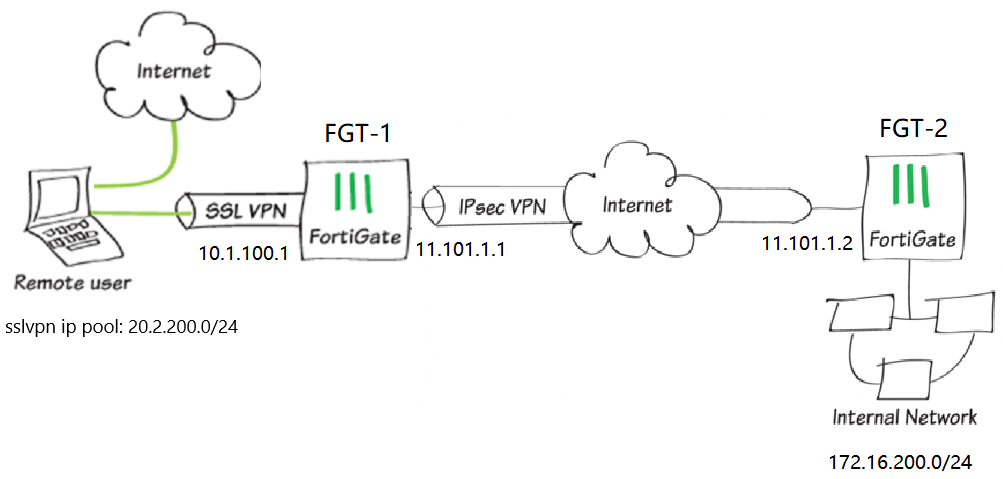
In this image the remote Fortigate represents Azure cloud the customer servers are located there. Its unhelpfully called Technical Tip. In Windows 10 releases prior to 1903 the ConnectionStatus will always report DisconnectedThis has been fixed in Windows 10 1903.

When ordering an SSL Certificate from our system approval methods cannot be changed once chosen. Approver email HTTP verification and DNS TXT record. In this image the local Fortigate represents the customer on site Fortigate.

When see only encapsdecaps packets at one end it is likely an issue with routing thus return traffic cannot hit FirewallsRouters for being encrypted. Support for BYOD Wireless that tunnels to the device 10 VDOM Think of this as virtual versions of the fortigate all within one box Juniper has this too InterVLan Routing Application filtration with Layer 7 analysis Data Leak Protection Vulnerability Scanning SSL intercept Youtube for education settings Excellent Web Filtration Two form factor authentication where required VLAN. If you are using Windows Server 2012 R2 or Windows Server 2016 Routing and Remote Access Service RRAS as your VPN server you must enable machine certificate authentication for VPN connections and define a root.

Fully ratified in late 2020 this is the applicable documentation for FortiOS versions 622 and above for Dynamic dialup VPN with OSPF or BGP. This may identify brief reconnection leaks. It has two internet connections port 1 and port 2.

Deep packet inspection i. Set net-device new route-based IPsec logic internet search this and. Determining which Policy is applied when a user logs into SSL VPN.

The Pre-Shared Key is specific to your gateway and can be found in your devices configuration guide. The tattoo sounds find to me but at the same time its not for everyone. FortiGate VPN Default Config Allows MitM Attacks.

Then I would connect to my VPN and continue with what I needed to do. Rather than stop dependent services individually uses net stop y nlasvc to force the stop of dependent services. Manually interrupt your internet connection disconnect while the VPN client is running.

Then the second person cant get a connection. I have had a scenario where only one person can successfully connect to the VPN at a time. Configure IPSec - 4 Simple Steps.

The peers pre shared key is set to firewallcx and its public IP Address is 1112. 1500 VPN servers in 94 countries. Indeed your Encryption Domains are also your VPN IP peers 1014013450 and 192168110 that is incorrect.

If the start and stop time are identical the schedule will run for 24 hours. The naïve way is to block port 443 but a simple proxy can get around this. It logs restarts to a text file so you can check how often a restart is required.

This is hard to find. Its whoever booted up first and logged on. 1500 VPN servers in 94 countries.

Local LAN is port 3. Ad Dont Let Your ISP Sell Your Browsing Data. Every time R1 tries to establish a VPN tunnel with R2 1112 this pre shared key will be used.

Your show crypto ipsec sa output looks strange as I do not see Encryption Domains Local and Remote subnets at both end. So its common that married couples are both connecting using there own company provisioned Laptops using AOVPN over the same broadband connection. A threat actor has leaked a list of almost 500000 Fortinet VPN credentials stolen from 87000 vulnerable FortiGate SSL-VPN devices.

To configure IPSec we need to setup the following in order. And as mentioned above its task set to run every five minutes indefinitely. Load a few different test websites while the VPN is reconnecting.

Meet The 1 VPN Service for Singapore.

Friday, October 15, 2021

Fortinet Ssl Vpn

Go to Settings Network Wireless VPN. Fortinets business communications solution enables you to seamlessly makereceive calls check voicemail messages and do more.


All About Networking Forticlient Vpn Ssl Stops At 40 Ssl Networking 40th

Surfing the Web is Not What it used to be.

Fortinet ssl vpn. Once that is verified the VPN should change the status to connected. Sign in with your credentials. Using end-to-end encryption E2EE an SSL VPN enables remote users such as corporate employees.

Fortinet administrators can configure log in privileges for system users and which network resources are available to the users. Open the FortiClient Console and go to Remote Access. Tunnel-down based on requirements as shown in the following screen shots.

Fortinet has warned that 87000 sets of credentials for FortiGate SSL VPN devices have been published online. This article details an example SSL VPN configuration that will allow a user to access internal network infrastructure while still retaining access to the open internet. Create new VPN connection.

The historic logs for Users connected via ssl-vpn can be viewed under. The VPN-only version of FortiClient offers SSL VPN and IPSecVPN. Go to VPN Manager SSL-VPN and select Portal Profiles in the tree menu.

Click Create New in the toolbar or right-click and select Create New. Select Customize Port and set it. Set VPN Type to SSL VPN.

Then select Fortinet SSL VPN Client as the provider. Set Remote Gateway to the IP of the listening FortiGate interface in this example 17220120123. Ad Most Reliable VPN.

Dont Let Your Data be passed to 3rd Parties. Fast Servers in 94 Countries. An SSL VPN is a virtual private network which uses the Secure Layer Socket SSL or the Transport Layer Security TLS protocol in web browsers to create a secure remote VPN connection between the endpoint device and the SSLTSL server.

In tunnel mode the SSL VPN client encrypts all traffic from the remote client computer and sends it to the FortiGate through an SSL VPN tunnel over the HTTPS link between the user and the FortiGate. The portal configuration determines what the user sees when they log in to the portal. Provide the connection name and server address.

Log Report - Event Log - VPN in v52x Log Report - VPN Events in v54x Log Report - VPN Events in v60x Log Report - Events and select VPN Events in 62x It is necessary to Add Filter as Action. Restricting Access in the SSL-VPN settings worked a treat. Hello I use Forticlient 64 and I am trying to connect to My customers network through a SSLVPN But when I try to establish connection I get Credential or ssl vpn configuration is wrong -7200 I can guarantee I have the correct credentials.

The intuitive interface and calling experience let you connect to colleagues customers. 2 Configure the SSL-VPN setting to allow access to portal. Ad Most Reliable VPN.

The SSL VPN web portal enables users to access network resources through a secure channel using a web browser. Fast Servers in 94 Countries. Probably everyone affected uses 10443 as the VPN port and this might correspond to some other servicedevice that the script is looking or checking for.

To see the results. This article describes the steps to configure FortiGate to send RADIUS Accounting messages containing usernames and IP address of SSL VPN users. Fortinet FortiGate SSL VPN Setup SSL or Client VPNs are used to grant VPN access to users without an enterprise firewall such as remote workers or employees at home.

A virtual private network VPN is a service that allows a user to establish a secure encrypted connection between the public internet and a corporate or institutional network. A secure sockets layer VPN SSL VPN enables individual users to access an organizations network client-server applications and internal network utilities and directories without the need for specialized software. Dont Let Your Data be passed to 3rd Parties.

Multiple profiles can be created. Clearly some automated script searching the net for weakdefault login creds. Introduction to SSL VPN - If you are new to SSL VPN or if you need guidelines to decide what features to use this chapter provides useful general information about VPN and SSL how the FortiGate unit implements them and gives guidance on how to choose between SSL and IPSec.

Creating SSL VPN portal profiles. 1 Keep Split Tunneling routing address blank in SSL-VPN portal. 3 Configure the FQDN for which it.

To create portal profiles. A threat actor has leaked a list of almost 500000 Fortinet VPN credentials stolen from 87000 vulnerable FortiGate SSL-VPN devices. The FortiGate establishes a tunnel with the client and assigns a virtual IP VIP address to the client from a range reserved addresses.

- If I go to the web portal Authentication is OK but its not usable for tunneling since my customer enforces the usage of Forticlient - If I use. The California-based cybersecurity firm said on Wednesday that it is aware of the. Surfing the Web is Not What it used to be.

The breach list provides raw access to organizations in 74 countries including the USA India Taiwan Italy France. Add a new connection. To create SSL VPN portal profiles you must be logged in as an administrator with sufficient privileges.

What You Might Want To Know About Vpn Fortigate And Why

Now you can select how you want your internet traffic to use the VPN services. If its always on you can be sure that your internet traffic wont be sent if the VPN goes down.


Ipsec Vpn Configuration Guide For Fortigate 60d Firewall Zscaler

You want to delete an unused AddressObject but you.

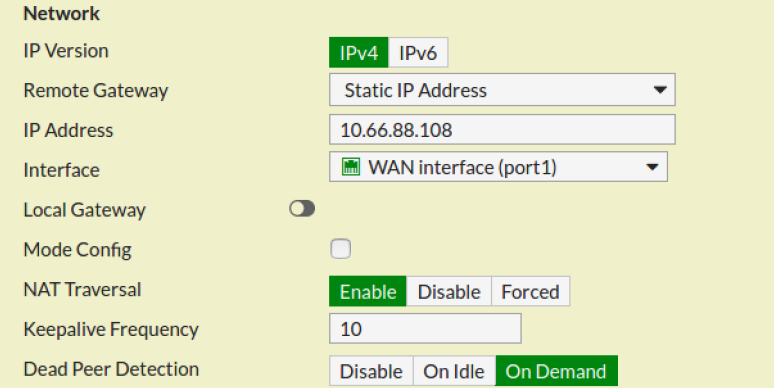
What you might want to know about vpn fortigate and why. So you want to set the NAT-T keepalives. The most important part in our scenario is the fact that communication is based on certificates so its independent on user accounts and their password. I recently rebuilt all my tunnel SSID to bridge with vlans and its night and day 421-E on a 60D Edit.

Though I generate and archive syslogs from the FortiGates and my other devices they are not nearly as useful as the logs on the FortiAnalyzer especially as Fortinet has some non-standard fields or at least they used to -- havent checked in a while. Anything sourced from the FortiGate going over the VPN will use this IP address. Not exactly Merakis fault but if Meraki didnt rely on MS for VPN connectivity software the issue would be null.

Fnsysctl ifconfig -a port1. If you need high throughput Fortinet will be the best. I want to add SSL VPN in the future but for now PPTP is fine.

In ExpressVPN Network Lock is the Kill Switch. If youre considering a VPN you might want to read these articles first. Lets look at some more diag vpn outputs.

Bridge is performant but can involve using vlans unless you want all your SSID in the same subnet as the AP. You will need to create those rules in order for the VPN to function properly. Nat_traversalyes Also DPD could be used within your setup.

Its not at all uncommon to see 100-1k vpn-ipsec-tunnels nailed to a fortigate. From a sheer performance aspect bridge is the way to go. Although the differences in number between them is still debatable.

A few notes on the FortiGate VPN configuration. If you concern more to applications latency Palo Alto is the right answer. Fortigate has a CLI interface for advanced users that want that level of control.

I havent done a VPN client solution with Fortigate to compare. The above does not include the firewall rules ACLs that would be required to allow inbound VPN traffic to reach your network or outbound VPN traffic to reach the internet. Port1 is the port I needed to get the info for you can change this accordingly.

At the moment I got a working configuration but some things are not working properly. If your in AWS you probably want NAT-T so that might be part of the problems with e UDP sessions dying. I often hear that only US connections would be accessing their services so why allow others who might not be on the up and up.

One of the most important option within fortigate diagnostics is our phase1 filters. Understand you wanted performance aside but. CLI My_Forti_OS get system performance firewall statistics There is also a more generic system performance command that will not only give you some valuable system-wide network and session information but it will also show some cpu data and general stats for IPSVirus-detection services that.

Check out the screenshot below. This object dependency you are likely to find in a default configuration for a FortiGate 60B and other products that use Switch to Interface Mode. In a hub or a service provider arena you might havd a dozen or more vpn-tunnels.

Everything is working fine but Ive got some problems with the PPTP VPN connection. If you need more up to date or get as quick as possible for zero day attack you could choose Check Point. Dpddelay30 dpdtimeout60 dpdactionrestart Just match it to the fortigate if you.

The Fortigate has a stat specific for anything that goes though its fw service and that is. Also you should keep in mind that a VPN service that offers a dedicated IP address is generally much more expensive and less secure for your privacy since its easier to associate search queries with your address. On some FortiGate units such as the FortiGate 94D you cannot ping over the IPsec tunnel without first setting a source-IP.

To prevent leaks employ a Kill Switch when using a VPN. Sincere about security and privacy StrongVPN Review. As you know for communication between FortiGate and FortiManager responsible is FGFM protocol which is well described in the FortiGate FortiManager - Communications Protocol Guide.

Why you might need to change it. In this scenario you must assign an IP address to the virtual IPsec VPN interface. Of course thats not 100 guaranteed and you still might be asked to fill in a CAPTCHA if you are using a VPN anyway.

Run an Ifconfig from the Fortinet FortiGate by running this command. Ive got a fortigate 40C here and copied the config mainly from a Fortigate60. So you might want to try it out to see if it works for you.

The issues seem to be caused by Microsoft updates affected the VPN in Windows 10.